How I Built AI Tools That Help 130,000+ Students Study
A technical look at building AI-powered learning tools for university students.
Nigeria’s National Open University serves over 130,000 students. This makes it one of Africa’s largest distance learning institutions. These students face dense 500-page PDFs, limited study resources, and almost no practice opportunities before exams. As a NOUN graduate myself, I built NounStudy to solve these problems with AI. This is the technical story of how.

The Problem Worth Solving
Let me expand on those challenges.
Each course comes with PDF materials ranging from 100 to 500 pages of dense academic content. Students often receive these materials weeks before exams with little guidance on what to prioritize.
Unlike traditional universities with lecture recordings and tutorials, distance learners are largely on their own. They must extract key concepts, create their own summaries, and figure out what’s actually exam-relevant.
Past exam questions are scarce and often outdated. Students have no way to test their understanding before the actual exam.
I realized that AI could address each of these pain points. Not by replacing the learning process, but by augmenting it. The goal was to turn raw course materials into structured, actionable study resources that students could actually use.
AI-Powered Course Summarization
The first major feature I built was an AI system that turns 100+ page PDF course materials into structured study notes. Making content shorter is easy. Making it actually useful for exam prep? That’s the real challenge.
How It Works
When a student requests notes for a course, the system extracts text from the original course PDF, analyzes the document structure to identify modules and units, and then generates a full summary with a specific format designed for exam preparation.
The output follows a carefully designed structure. It starts with a 1-2 sentence course description, followed by 3-5 specific learning objectives. The bulk of the content consists of detailed unit summaries with key concepts, examples, and applications.
Content-Aware Formatting
One of the technical challenges I solved was making the AI output format-aware based on content type.
For STEM courses, formulas and equations are rendered properly using MathJax and LaTeX syntax. The prompt explicitly maps Unicode math symbols to their MathJax equivalents. For example, “x^2” gets proper superscript notation, and complex formulas like integrals and summations render correctly.
When visual representations would help (flowcharts, hierarchies, processes), the AI generates Mermaid.js diagram code that renders directly in the browser.
When the content involves comparing concepts, the output includes properly formatted markdown tables.
This discipline-aware approach means a Computer Science student sees correctly rendered code and algorithms, while a Law student gets properly formatted case citations and statutes.
Intelligent Practice Question Generation
The second major AI feature tackles the problem of exam preparation. Students need practice, lots of it, with questions that actually resemble what they’ll face in exams.
The Uniqueness Challenge
Early in development, I discovered a critical problem. The AI would sometimes generate questions that were too similar to ones it had already created. If a student got 20 practice questions and 5 of them were essentially the same concept rephrased, that defeats the purpose.
Jaccard Similarity for Duplicate Detection
I implemented a duplicate detection system using the Jaccard similarity algorithm. Here’s how it works.
First, each question is converted to a set of meaningful words. Stop words (like “the”, “is”, “a”) are filtered out, and the remaining words are normalized to lowercase.
Then, for any two questions, the algorithm calculates how much their word sets overlap using the Jaccard index:
If two questions have a similarity score above 0.6 (60% word overlap), the newer question is discarded and the system generates a replacement.
This approach is more reliable than simple string matching because it catches semantic duplicates, questions that ask the same thing using different words.
Over-Generation Strategy
To ensure students always get their requested number of questions, the system uses an over-generation strategy. When a student requests 20 questions, the AI actually generates 30 (a 1.5x factor). After filtering duplicates against both the current batch and previously generated questions, the remaining unique questions fill the request.
Question Type Distribution
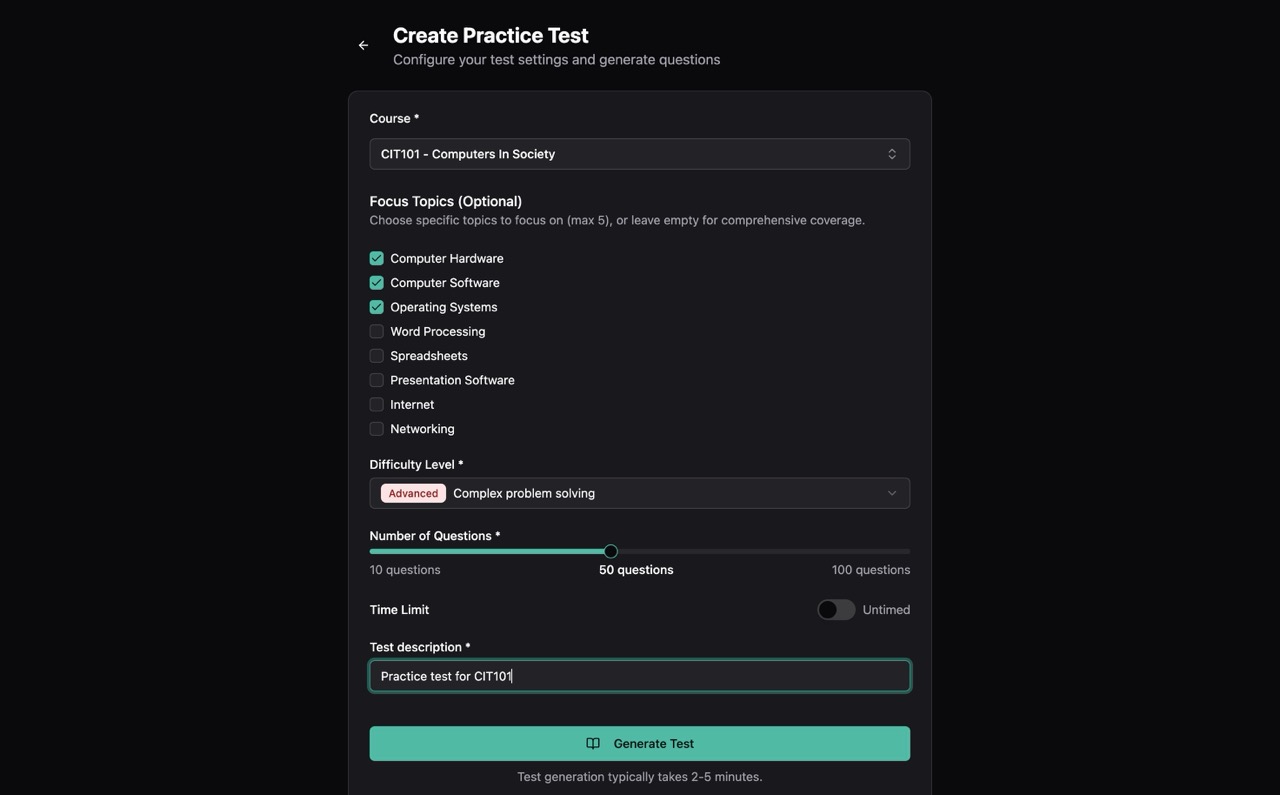
The system generates three types of questions tailored for computer-based testing. Multiple choice questions offer 4 options with plausible distractors. Fill-in-the-blank questions test key term recall with acceptable answer variations. True/false questions check conceptual understanding through carefully worded statements.
The distribution adapts based on difficulty level. Beginner tests have more multiple choice for guided learning, while advanced tests include more fill-in-the-blank questions that require precise recall.
Visual Learning with AI Mindmaps
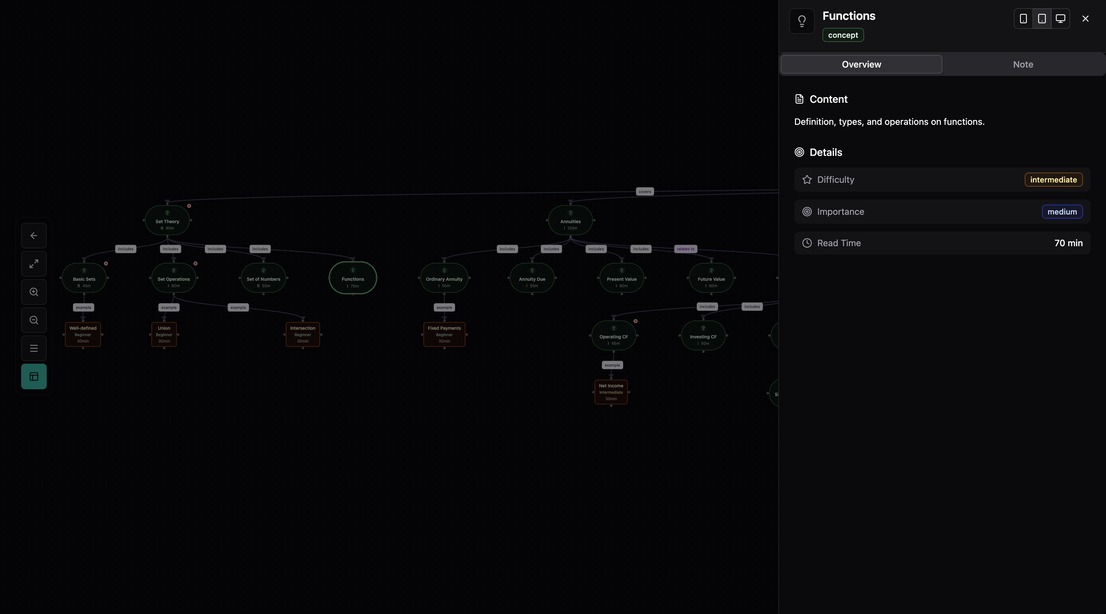
The third major AI feature turns course content into interactive visual knowledge maps. Students can click any node to dig deeper into a topic, turning the mindmap into an explorable learning tool rather than a static diagram.
Hierarchical Concept Extraction
The AI analyzes course content and extracts a hierarchical structure. The root node is the course title. Level 1 contains 5-8 main topics as primary branches. Level 2 has 2-4 subtopics per main topic. Level 3 holds key concepts, definitions, and examples.
Each node includes metadata about its importance (high/medium/low) and difficulty (beginner/intermediate/advanced), helping students prioritize their study time.
Real-Time SSE Progress Streaming
Generating a complete mindmap takes time. Analyzing hundreds of pages of content and structuring it into a coherent hierarchy is not instant. Rather than leaving students staring at a loading spinner, I implemented real-time progress updates using Server-Sent Events (SSE).
As the AI processes the content, students see the current processing stage (“Analyzing course structure…”), a progress percentage, and an estimated time remaining.
This creates a transparent experience where students understand what’s happening and can make informed decisions about whether to wait or return later.
On-Demand Detail Generation
A key innovation is the “click-to-expand” feature. When students click on a mindmap node, the system generates detailed study notes specifically for that concept. This creates a smooth flow between the high-level visual overview and the detailed content underneath.
Building with AI
I’d be remiss not to mention that building NounStudy itself was accelerated by AI tools. Claude Code became an essential part of my development workflow. It helped me explore implementation approaches and validate architectural decisions. It helped me debug complex issues across multiple services. And it helped me implement features faster by acting as a capable pair programmer.
This experience reinforced my belief that AI works best as an amplifier of human capability, not a replacement. The domain knowledge, understanding what Nigerian university students actually need, still comes from my own experience as a NOUN graduate. AI helped me execute that vision faster, but the product direction came from real frustrations I lived through.
Technical Architecture at a Glance
NounStudy runs on Cloudflare’s edge platform, which was crucial for serving students across Nigeria with low latency. Here’s the high-level architecture:
flowchart LR
    subgraph Client
        A[Student Request]
    end

    subgraph Edge["Cloudflare Edge"]
        B[Workers API]
        C[Durable Objects]
        D[Queues]
    end

    subgraph AI
        E[LLM API]
    end

    subgraph Storage
        F[R2 Storage]
        G[PostgreSQL]
    end

    A --> B
    B --> C
    C --> D
    D --> E
    E --> F
    B --> G
    F --> B
    B -.->|SSE Updates| A
The main API and web application runs on Cloudflare Workers, providing global edge deployment and automatic scaling.
Long-running AI generation tasks (notes, mindmaps, practice tests) are processed asynchronously through Cloudflare Queues. This prevents timeouts and provides reliable processing.
Durable Objects handle coordinating concurrent requests. When multiple students request the same course notes simultaneously, a Durable Object manages the lock to prevent duplicate AI generation calls.
The AI models powering content generation use different tiers based on the task. I use faster, lighter models for production workloads and more capable models for complex generation.
Generated content (notes, mindmaps) is stored in Cloudflare R2 and cached globally for fast retrieval.
The distributed locking pattern deserves special mention. When Student A requests notes for “Introduction to Economics,” the system creates a lock for that course ID and adds Student A to the waiting list. If Student B requests the same course while generation is in progress, they’re added to the waiting list too, with no duplicate AI call. When generation completes, all waiting students are notified simultaneously.
This prevents wasted API calls and ensures consistent content across all students.
Lessons Learned
What Worked Well
Defining explicit output schemas (using tools like Zod for validation and the model’s structured output mode) made the AI outputs reliable and parseable. The prompts specify exact formats, and the responses conform to those expectations.
Generic “summarize this content” prompts produce generic results. I invested heavily in understanding NOUN’s specific exam formats, grading patterns, and learning objectives. The prompts reference “NOUN CBT format” and “computer-marked assignments” because that context matters for generating useful content.
Rather than waiting for perfect AI outputs, the system is designed to handle partial results gracefully. If the AI generates fewer questions than requested, students still get what’s available with a note about the limitation.
Challenges Faced
AI API costs add up quickly at scale. I implemented aggressive caching (once course notes are generated, they’re reused for all students) and careful batching strategies for question generation.
AI outputs aren’t always consistent. Some course materials are better structured than others, which affects output quality. I added validation layers and fallback strategies to handle edge cases.
Students expect AI-generated content to be perfect. Managing those expectations while still delivering value required careful UX design. This meant explaining what the AI can and can’t do, and always providing paths to original source material.
Impact and Future Plans
Since launching NounStudy, the platform has helped thousands of students across hundreds of courses, generating study notes and practice questions that save hours of exam preparation time. Student feedback has been overwhelmingly positive, particularly around the time saved during exam preparation.
I’m continuing to expand the AI capabilities. I want to use student performance data to recommend personalized study sequences. I’m working on audio summaries and voice-based Q&A for learning on the go. And I’m exploring study groups with AI-facilitated discussions.
The goal remains the same: make quality education more accessible by using AI to bridge the gaps in traditional distance learning.
Try NounStudy
If you’re a NOUN student, NounStudy is available at nounstudy.com.
If you’re a fellow builder working on AI-powered education tools, I’d love to connect and share learnings. You can find me on LinkedIn, X, or GitHub.